A comprehensive financial analysis and recommendation system built using Google's Agent Development Kit (ADK).
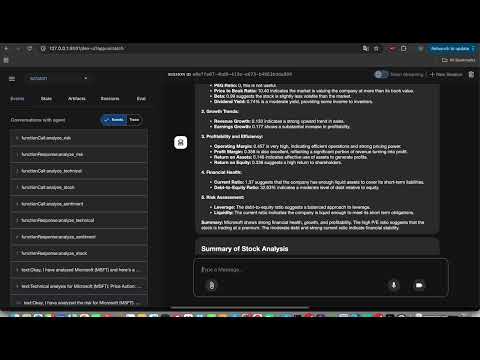
src/
├── sub_agent/
│   └── research/
│       ├── analysis_team/
│       │   ├── fundamental_agent.py      # Fundamental analysis of stocks
│       │   ├── technical_agent.py        # Technical analysis and indicators
│       │   ├── sentiment_agent.py        # Market sentiment analysis
│       │   └── risk_analysis_agent.py    # Risk assessment and metrics
│       ├── recommendation_team/
│       │   └── equity_product_recommendation_agent.py  # Stock recommendations
│       ├── writing_team/
│       │   └── writing_agents.py         # Report generation and review
│       ├── search_team/                  # Market research and data collection
│       ├── utils/
│       │   └── file_utils.py            # File handling utilities
│       └── prompts.py                    # Centralized agent instructions
├── utils/
│   └── pdf_generator.py                 # PDF report generation
├── agents_sample_reports/                # Example analysis reports
├── apps/                                # Application scripts
│   └── agent.py                         # Sample agent that creates report for a single stock leveraging the sub agents
└── archived/                           # Archived code and resources
- Fundamental Analysis: Financial statements, ratios, and growth metrics
- Technical Analysis: Price action, trends, and technical indicators
- Sentiment Analysis: News sentiment, analyst recommendations, and market sentiment
- Risk Analysis: Volatility, financial risk, and market risk assessment
- Equity product recommendations (buy, sell, hold)
- Focus on delta one products (stocks, ADRs)
- Report generation with executive summaries
- Multi-stage review process
- PDF report generation
- Professional formatting and structure
- Clone the repository:
git clone https://github.com/joycel-github/finance-agent-adk.git
cd finance-agent-adk- Set up the virtual environment:
python -m venv global_market_bot_env
source global_market_bot_env/bin/activate # On Windows: global_market_bot_env\Scripts\activate- Install dependencies:
pip install -r requirements.txt-
Set up environment variables:
- Copy
.env.exampleto.env:
cp .env.example .env
- Edit
.envand add your Gemini API key:
GEMINI_API_KEY=your_api_key_hereYou can get your Gemini API key from the Google AI Studio
- Copy
-
Run the ADK web interface:
cd src
adk web --port 8080- Access the web interface at
http://localhost:8080 - Select the type of analysis you want to perform
- Enter the stock symbol or other relevant information
- Review the generated analysis and recommendations
- Create a new agent file in the appropriate team directory
- Add the agent's prompt to
prompts.py - Update the agent's configuration in the main application
- Update the agent's prompt in
prompts.py - Modify the agent's implementation in its respective file
- Test the changes using the ADK web interface
- Fork the repository
- Create a new branch for your feature
- Make your changes
- Submit a pull request
This project is licensed under the MIT License - see the LICENSE file for details.
- Google's Agent Development Kit (ADK)
- yfinance for financial data
- All contributors and users of the system