Christoph made a great suggestions to replace placeholders during 1.copy or 3.install.
This way we could use a placeholder like #project.version# in the definition of the APEX application:
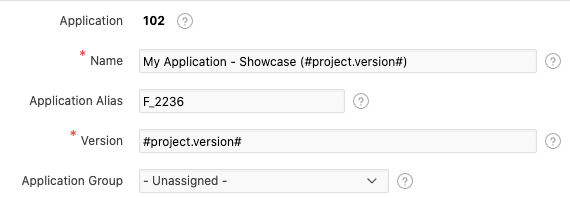
and replace this with the setting version in the opal-installer.json file:
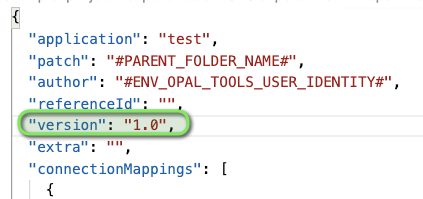
This way we can make sure that the version information is ALWAYS correctly propagated the to the installed APEX version.
We could also use this to replace placeholders in the package files.
This can be done similar to the gradle build file that I am using. When building the software binaries and the distribution - zip file, I replace specific placeholder in some files, e.g. all files in the folder src/doc:
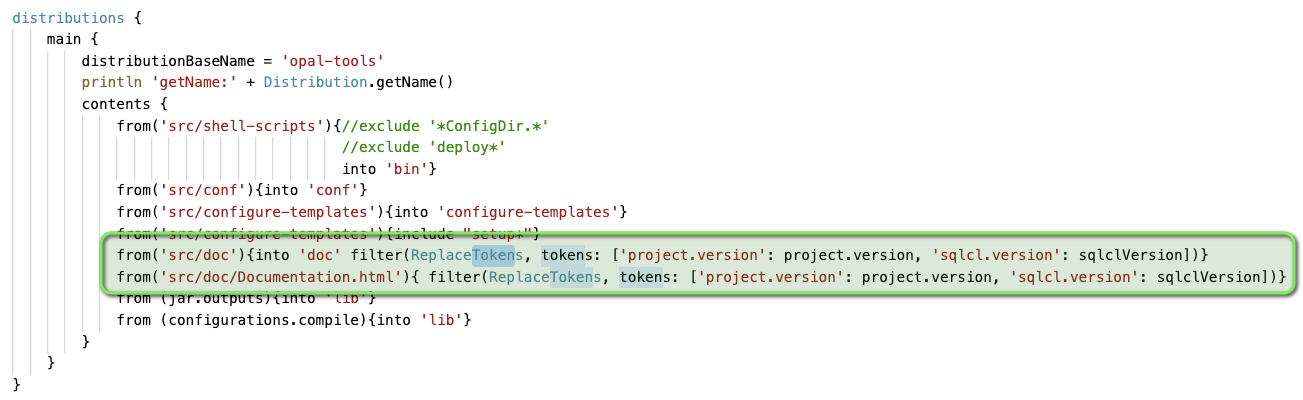
This could be implemented for example like this:
  "replacements": [
    {
      "fileRegEx": "/sql/.*apex.*/.*f*sql",
      "tokens": [{"#project.version#": "1.1"}, {"#var2#": "value2"}]
    },
The token values could ideally pick up values from environment variables or application/version in this opal-installer.json file itself. With that approach we could also limit the replacement using regular expressions to the files that we want to be affected. Working with replacements of text snippets in files can also have undesired side effects.


Christoph made a great suggestions to replace placeholders during
1.copyor3.install.This way we could use a placeholder like

#project.version#in the definition of the APEX application:and replace this with the setting

versionin the opal-installer.json file:This way we can make sure that the version information is ALWAYS correctly propagated the to the installed APEX version.
We could also use this to replace placeholders in the package files.
This can be done similar to the gradle build file that I am using. When building the software binaries and the distribution - zip file, I replace specific placeholder in some files, e.g. all files in the folder

src/doc:This could be implemented for example like this:
The token values could ideally pick up values from environment variables or application/version in this
opal-installer.jsonfile itself. With that approach we could also limit the replacement using regular expressions to the files that we want to be affected. Working with replacements of text snippets in files can also have undesired side effects.