

PowerShell feedback provider that surfaces a shorter alias when you run a long command. Inspired by oh-my-zsh alias-finder; built on PowerShell 7.4's native IFeedbackProvider subsystem.
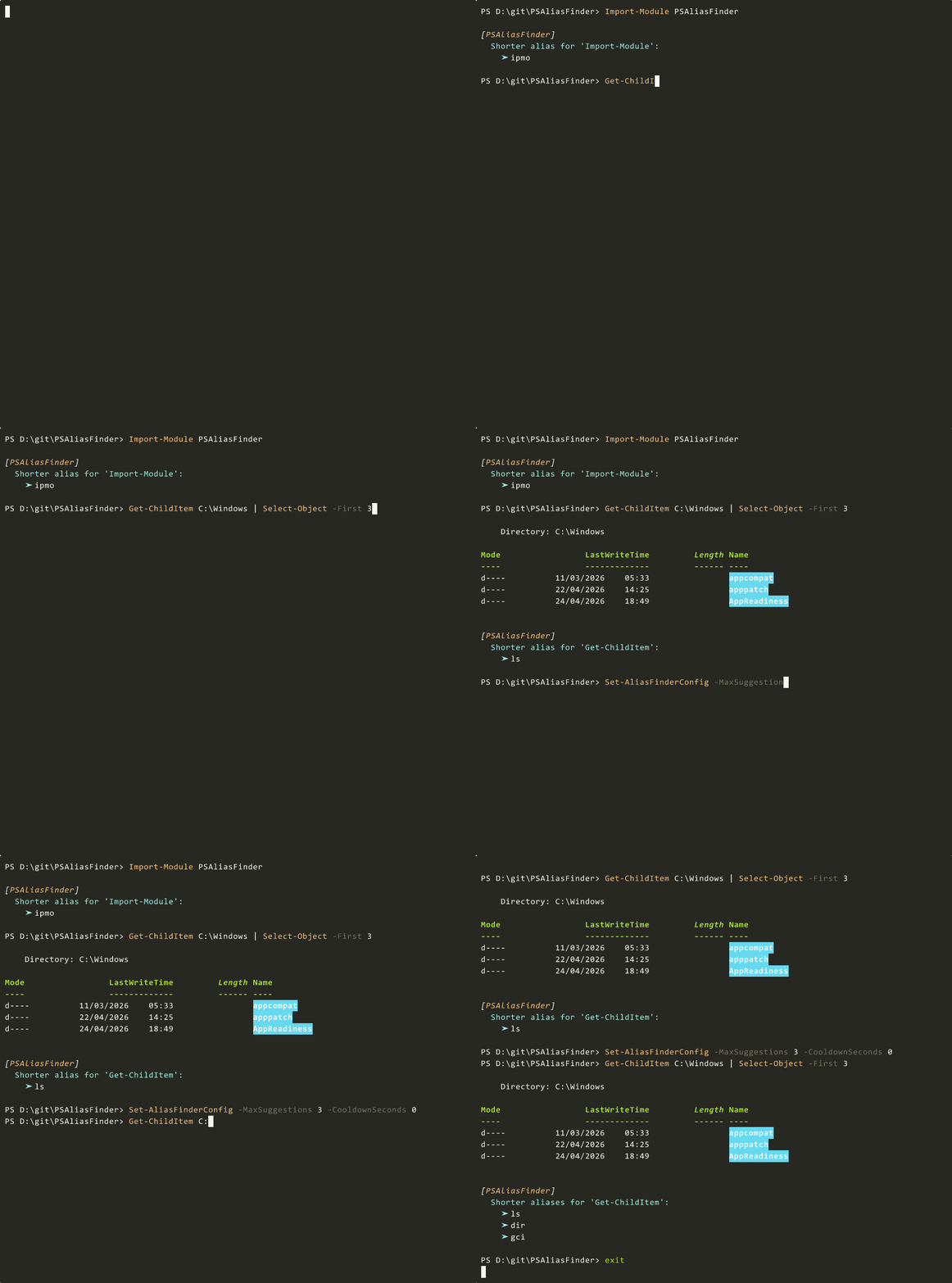
The suggestion renders in the native feedback block, alongside the built-in [General] "did you mean" provider, and follows the $PSStyle.Formatting.Feedback* theme. No Write-Host, no PSReadLine key bindings.
| PowerShell | Behavior |
|---|---|
| 7.6+ | Works out of the box. |
| 7.4 / 7.5 | Requires two experimental features and a pwsh restart: Enable-ExperimentalFeature PSFeedbackProvider and Enable-ExperimentalFeature PSSubsystemPluginModel. |
| 7.0–7.3, 5.1 | Not supported. Install 1.0.0 instead: Install-Module PSAliasFinder -RequiredVersion 1.0.0. |
Install-Module PSAliasFinder -Scope CurrentUser
Import-Module  PSAliasFinder
Add Import-Module PSAliasFinder to your $PROFILE to load it at session start.
Note: the 2.0.0 publish to PowerShell Gallery is pending. Until then, build from this repository — see
build.ps1and the Contributing section.
- Fires only on successful commands. Errors are handled by the built-in
[General]provider. - Shows the shortest alias (alphabetical tiebreak). One per command.
- Requires the command to be at least 8 characters, at most 1 pipe, at most 10 tokens, and the alias must save at least 4 characters.
- Does not suggest when the invoked name is itself an alias.
- Repeats no more than once every 30 minutes per command. Disable with
CooldownSeconds = 0.
Every threshold is exposed via Set-AliasFinderConfig.
Find-Alias (aliased as af, alias-finder) provides explicit queries:
Find-Alias Get-ChildItem
# gci -> Get-ChildItem
# ls  -> Get-ChildItem
# dir -> Get-ChildItem

af Get-Process
# gps -> Get-Process
# ps  -> Get-Process

af "docker ps" -Force            # bypass filter
af Process     -Longer           # also match aliases whose definition contains the word
af Get-ChildItem -Cheaper        # only aliases strictly shorter than the input
$result = af Get-Process -Quiet # objects only, no console outputGet-AliasFinderConfigEnabled : True
MinCommandLength : 8
MaxPipes : 1
MaxArguments : 10
MinCharsSaved : 4
CooldownSeconds : 1800
MaxSuggestions : 1
IgnoredCommands : {}
ConfigFile : C:\Users\<you>\AppData\Roaming\PSAliasFinder\config.json
Set-AliasFinderConfig
    [-Enabled <bool>]
    [-MinCommandLength <int>]       # default 8
    [-MaxPipes <int>]               # default 1
    [-MaxArguments <int>]           # default 10
    [-MinCharsSaved <int>]          # default 4
    [-CooldownSeconds <int>]        # default 1800; 0 disables
    [-MaxSuggestions <int>]         # default 1
    [-IgnoredCommands <string[]>]   # replaces the list
    [-AddIgnored <string[]>]        # appends
    [-RemoveIgnored <string[]>]     # removes
    [-Reset]                        # restore defaults
    [-PassThru]                     # emit the resulting config
Changes persist to disk and take effect on the next command. No reimport required.
Examples:
Set-AliasFinderConfig -MinCommandLength 10 -CooldownSeconds 600 -PassThru
Set-AliasFinderConfig -MaxSuggestions 3
Set-AliasFinderConfig -AddIgnored Get-ChildItem,Get-Process
Set-AliasFinderConfig -Enabled:$false   # module stays loaded, provider stays silent
Set-AliasFinderConfig -ResetDefault location: $env:APPDATA\PSAliasFinder\config.json on Windows, ~/.config/PSAliasFinder/config.json on Linux/macOS.
Override with PSALIASFINDER_CONFIG_DIR for portable installs or CI. The directory is created on first save.
The module tells you which alias exists. Typing it efficiently is PSReadLine's job. After you run ls C:\Windows once, PSReadLine's history predictor surfaces it when you start typing l on a future prompt. One-time setup:
Set-PSReadLineOption -PredictionSource HistoryGet-PSSubsystem -Kind FeedbackProvider # expect PSAliasFinder alongside 'general'2.0.0 is a major version bump. The PSReadLine Enter hook and the Write-Host-styled output are gone, along with two public commands:
| 1.0.0 | 2.0.0 |
|---|---|
Set-AliasFinderHook -Enable / -Disable |
Not needed. The feedback provider auto-registers on import. Use Set-AliasFinderConfig -Enabled:$false to silence. |
Test-CommandAlias <cmd> |
Use Find-Alias <cmd>. |
$global:PSAliasFinderConfig = @{ AutoLoad = $true } |
Not needed. |
No shims are shipped; calls to the removed commands raise CommandNotFoundException. If you depend on 1.0.0 behavior, pin to it:
Install-Module PSAliasFinder -RequiredVersion 1.0.0A binary module — a compiled .NET 8 DLL under bin/ — registers a single class implementing IFeedbackProvider, IModuleAssemblyInitializer, and IModuleAssemblyCleanup. After each successful command the engine invokes GetFeedback, which applies the filter chain, consults a 60-second TTL alias cache, and returns a FeedbackItem (or null). The host owns rendering.
The cache is built lazily on the first suggestion, so Import-Module has no measurable cost. GetFeedback benchmarks at about 0.01 ms with a warm cache — four orders of magnitude under the 1000 ms engine budget.
Issues and PRs welcome at github.com/backmind/PSAliasFinder. Before submitting, run:
./build.ps1
pwsh -File ./tests/test-feedback.ps1   # 7 algorithm cases
pwsh -File ./tests/test-psm1.ps1       # 21 integration assertions
Both suites must be green.
MIT — see LICENSE.
- Inspired by oh-my-zsh alias-finder.
- Built on the PowerShell feedback provider subsystem.
microsoft/winget-command-not-foundserved as the structural reference.