- Currently working on OpenGL backend
- CHECK assets/shaders TO SEE IF IT WAS UPDATED!
- Coordinate Pipeline:
- Vertex coordinates start in local space.
- Transform local coords to world space via the model matrix.
- Transform the world coordinates to view space via the view matrix.
- Transform the view coordinates to clip space via the projection matrix.
- Transform the clip coordinates to screen space via the viewport transform.
- ModelViewProjection Matrix:
- Local/Object Space: s
- World Space: s
- View/Eye Space: s
- Clip Space: s
- Screen Space: s
- Graphics Pipeline: The process that handles transforming 3D coordinates to the 2D pixels rendered on your display.
- Shaders: Small programs that run on the GPU and determine how pixels should be rendered.
- Vertex: Collecton of data per 3D coordinate.
- Primitives: What render types to form with the data: triangles, points, long lines?
- Vertex Shader: The programmable stage that is responsible for transforming the vertices. Allows for basic processing on the vertex attributes. In other words, allows us to transform 3D coordinates into different 3D coordinates. This stage in the pipeline takes single vertices as input.
- Primitive Assembly: Takes in all the vertices from the Vertex Shader, that form a primitive, and assembles all the point(s) in the Primitives shape that was given.
- Geometry Shader: The programmable stage that uses the collection of vertices that form a primitive from the Primitive Assembly, and has the ability to generate other shapes by emitting new vertices to for new primitives.
- Rasterization: The stage that maps the resulting primitives to the corresponding pixels on the final screen. These fragments will be used by the fragment shader after Clipping.
- Clipping: Discards all fragments that are outside the view.
- Fragment Shader: The programmable stage that is responsible for calculating the final color of the pixel.
- Alpha Test and Blending: This stage checks if the corresponding depth(and stencil) value of the fragment, and uses those to check if the resulting fragment is in front of or behind other objects. This will determine if the fragment should be discarded. This stage also check for alpha values and blends the object accordingly.
- Normalized Device Coordinates: A small normalized space where x, y, and z are within the ranges from -1.0 to 1.0. These will eventually be transformed into screen-space coordinates via the viewport transform. The resulting screen-space corrdinates are then transforms to fragments as inputs to the fragment shader.
- Vertex Buffer: Known in OpenGL as Vertex Buffer Objects(VBOs). Stores a large number of vertices in the GPU's memory.
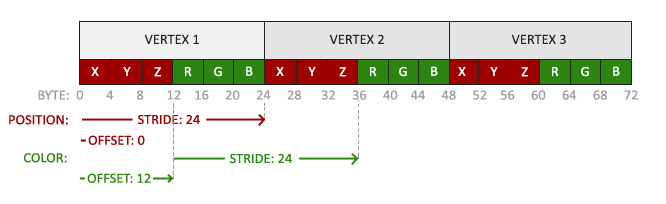
- Vertex Attributes: Used to represent vertex data.
- Value: x, y, and z are stored as 32-bit(4 byte) floating point values.
- Stride: Each vertex is componsed of 3 values.
- Offset: No padding between each of the 3 sets of values. They are packed in the array.
- Position: The first value in the data is at the beginning of the buffer.
- Vertex Array: Known in OpenGL as Vertex Array Objects(VAOs). Once bound, any subsequent vertex attirbute calls will be stored inside the VAO.
- Index Buffer: Known in OpenGL as Element Buffer Objects(EBOs). Stores indices that will be used to decide what vertices to draw. Eliminates multiple vertices at the same position. So instead of using 6 vertices to draw a rectangle(2 triangles), using indices we only need 4 vertices.
- Indexed Drawing: The process of using index buffers to eliminate the need of overlapping vertices.
- Texture: A image (typically 2D) used to add detail to an object.
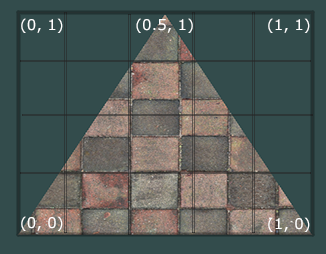
- Texture Coodinate: Specifies what portion of the image to sample from. Range from (0,1) for 2d. The origin (0,0) is in the bottom left.
- Sampling: The process of retrieving the texture color using the texture coordinates.
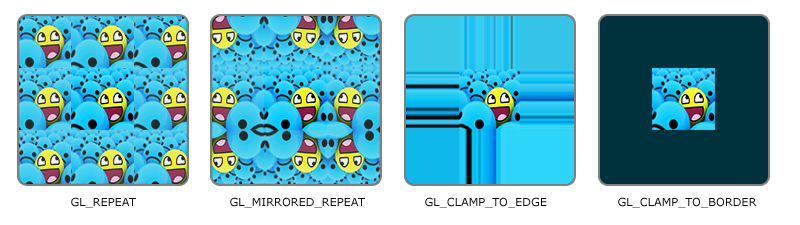
- Texture Wrapping: The handling of what to do with the texture when it goes outside the range of the texture coordinates( (0,0) to (1,1) ).
- Texel: Texture Pixel
- Texture Filtering: (CHECK FOR ACTUAL DEFINITION) The process of which texel to map to the texture coordinate.
- Nearest: Also called nearest neighbor or point filtering. Selects the texel whose center is closest to the texture coordinate.
- Linear: Also known as bilinear filtering. Interpolates the color values from the texture coordinates's neighboring texels.
- Magnifying and Minifying: During these operations, different texture filtering can be used depending on the operation. Such as Nearest filtering for minifying operations, and Linear for magnifying operations.
- Mipmaps: A collection of texture images where each subdequent texture is twice as small compared to the previous one.
- Depth Buffer: Where depth information is stored.
- Depth Testing: The process of determining of a fragment is behind another fragment, if so then the fragment is discarded as it would not be seen anyways.
- Framebuffer: A combination of screen buffers that is stored in GPU memory.
- Attachment: A memory location that can act as a buffer for the framebuffer. An attachment can take either a texture or a renderbuffer.
- OpenGL allows for binding several buffers at once, as long as they have a different buffer type.
- OpenGL has Vertex Attributes disabled by default, enable by using glEnableVertexAttribute(index).
- VAOs store the following:
- Calls to glEnableVertexAttribArray or glDisableVertexAttribArray.
- Vertex attribute configurations via glVertexAttribPointer.
- Vertex buffer objects associated with vertex attributes by calls to glVertexAttribPointer
- Source
- When talking about the vertex sahder, each input variable is known as an Vertex Attribute.
- There is a maximum number of vertiex attrivutes that we're allowed to declare. OpenGL guarantees there are always at least 16 4-component VAs, but some hardware may allow more.
- Uniforms are another way to pass data from our CPU to the shaders on the GPU. They are global, in the sense that a uniform variable is unique per shader program object, and can be accessed from any shader at any stage in the shader program.
- Uniforms keep their values until they're either reset or updated.
- NOTE: Keep in mind that if you declare a uniform that isn't used anywhere in your GLSL code, the compiler will silently remove the variable from the compiled version.