The Issue or Bug
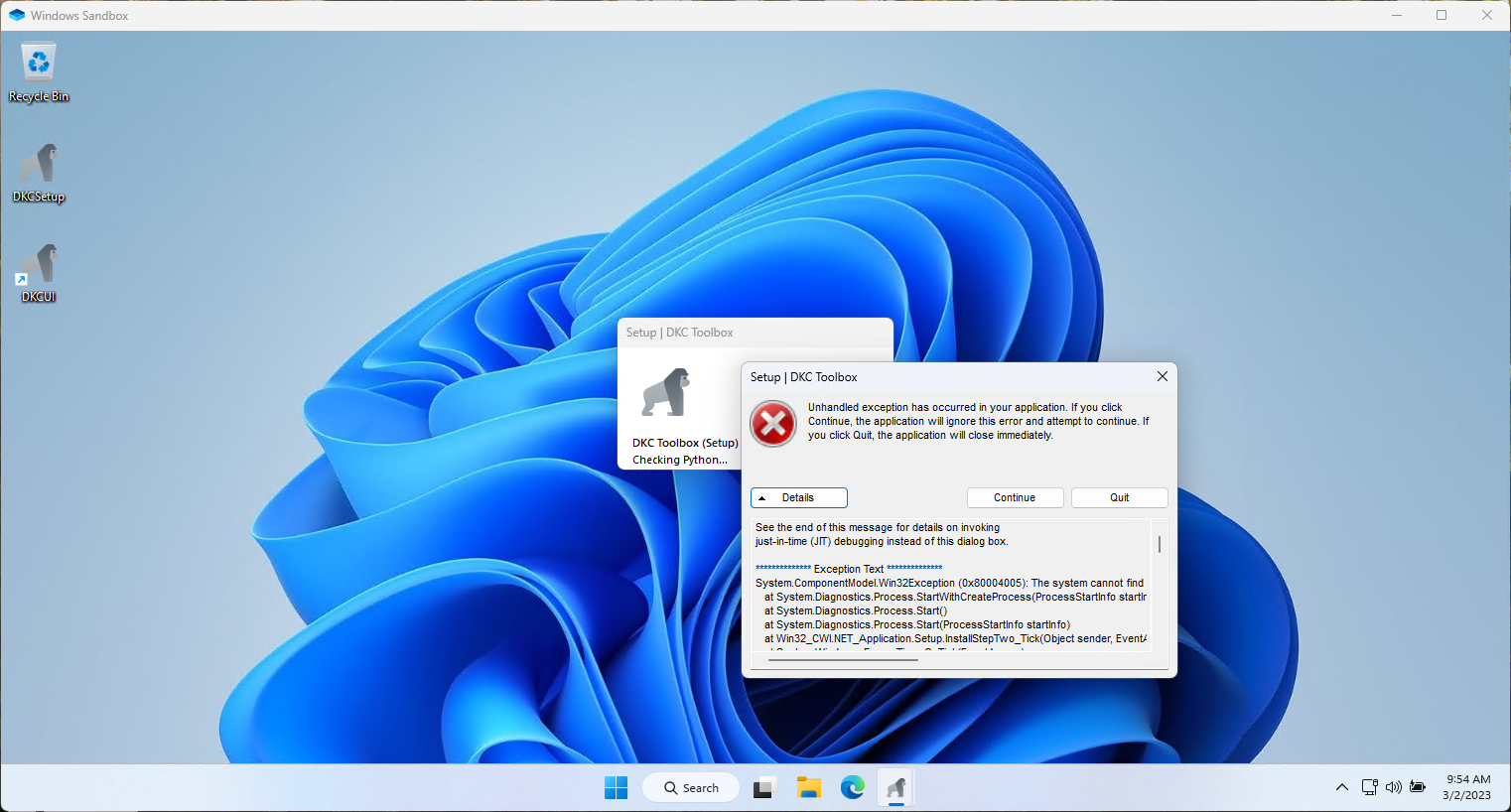
When attempting to run DKCUI for the first time in Windows Sandbox, the application throws an unhandled exception.
Version
DKCUI Version 0.01
Operating System
Windows 11
Steps to reproduce the behavior
- Open a new Windows Sandbox environment
- Run the installer for DKCUI
- Complete the install and run DKCUI
- Observe the first run setup
- Issue is encountered, application throws unhandled exception
Screenshots
Additional Context
Full unhandled exception error message:
See the end of this message for details on invoking
just-in-time (JIT) debugging instead of this dialog box.

************** Exception Text **************
System.ComponentModel.Win32Exception (0x80004005): The system cannot find the file specified
   at System.Diagnostics.Process.StartWithCreateProcess(ProcessStartInfo startInfo)
   at System.Diagnostics.Process.Start()
   at System.Diagnostics.Process.Start(ProcessStartInfo startInfo)
   at Win32_CWI.NET_Application.Setup.InstallStepTwo_Tick(Object sender, EventArgs e) in C:\Users\rwalpole\Documents\GitHub\DKC-Toolbox\Project CWI\Win32 CWI .NET Application\Setup.cs:line 72
   at System.Windows.Forms.Timer.OnTick(EventArgs e)
   at System.Windows.Forms.Timer.TimerNativeWindow.WndProc(Message& m)
   at System.Windows.Forms.NativeWindow.Callback(IntPtr hWnd, Int32 msg, IntPtr wparam, IntPtr lparam)


************** Loaded Assemblies **************
mscorlib
    Assembly Version: 4.0.0.0
    Win32 Version: 4.8.9139.0 built by: NET481REL1LAST_B
    CodeBase: file:///C:/Windows/Microsoft.NET/Framework/v4.0.30319/mscorlib.dll
----------------------------------------
DKCUI
    Assembly Version: 1.0.0.0
    Win32 Version: 1.0.0.0
    CodeBase: file:///C:/Program%20Files%20(x86)/RWE%20Labs/DKCUI/DKCUI.exe
----------------------------------------
System
    Assembly Version: 4.0.0.0
    Win32 Version: 4.8.9139.0 built by: NET481REL1LAST_B
    CodeBase: file:///C:/Windows/Microsoft.Net/assembly/GAC_MSIL/System/v4.0_4.0.0.0__b77a5c561934e089/System.dll
----------------------------------------
System.Windows.Forms
    Assembly Version: 4.0.0.0
    Win32 Version: 4.8.9075.0 built by: NET481REL1LAST_C
    CodeBase: file:///C:/Windows/Microsoft.Net/assembly/GAC_MSIL/System.Windows.Forms/v4.0_4.0.0.0__b77a5c561934e089/System.Windows.Forms.dll
----------------------------------------
System.Drawing
    Assembly Version: 4.0.0.0
    Win32 Version: 4.8.9032.0 built by: NET481REL1
    CodeBase: file:///C:/Windows/Microsoft.Net/assembly/GAC_MSIL/System.Drawing/v4.0_4.0.0.0__b03f5f7f11d50a3a/System.Drawing.dll
----------------------------------------
System.Configuration
    Assembly Version: 4.0.0.0
    Win32 Version: 4.8.9032.0 built by: NET481REL1
    CodeBase: file:///C:/Windows/Microsoft.Net/assembly/GAC_MSIL/System.Configuration/v4.0_4.0.0.0__b03f5f7f11d50a3a/System.Configuration.dll
----------------------------------------
System.Xml
    Assembly Version: 4.0.0.0
    Win32 Version: 4.8.9032.0 built by: NET481REL1
    CodeBase: file:///C:/Windows/Microsoft.Net/assembly/GAC_MSIL/System.Xml/v4.0_4.0.0.0__b77a5c561934e089/System.Xml.dll
----------------------------------------
Accessibility
    Assembly Version: 4.0.0.0
    Win32 Version: 4.8.9032.0 built by: NET481REL1
    CodeBase: file:///C:/Windows/Microsoft.Net/assembly/GAC_MSIL/Accessibility/v4.0_4.0.0.0__b03f5f7f11d50a3a/Accessibility.dll
----------------------------------------
DotNetZip
    Assembly Version: 1.16.0.0
    Win32 Version: 1.16.0
    CodeBase: file:///C:/Program%20Files%20(x86)/RWE%20Labs/DKCUI/DotNetZip.DLL
----------------------------------------
System.Core
    Assembly Version: 4.0.0.0
    Win32 Version: 4.8.9139.0 built by: NET481REL1LAST_B
    CodeBase: file:///C:/Windows/Microsoft.Net/assembly/GAC_MSIL/System.Core/v4.0_4.0.0.0__b77a5c561934e089/System.Core.dll
----------------------------------------

************** JIT Debugging **************
To enable just-in-time (JIT) debugging, the .config file for this
application or computer (machine.config) must have the
jitDebugging value set in the system.windows.forms section.
The application must also be compiled with debugging
enabled.

For example:

<configuration>
    <system.windows.forms jitDebugging="true" />
</configuration>

When JIT debugging is enabled, any unhandled exception
will be sent to the JIT debugger registered on the computer
rather than be handled by this dialog box.
Suggested Resolution
Requires triage and investigation.


The Issue or Bug
When attempting to run DKCUI for the first time in Windows Sandbox, the application throws an unhandled exception.
Version
DKCUI Version 0.01
Operating System
Windows 11
Steps to reproduce the behavior
Screenshots
Additional Context
Full unhandled exception error message:
Suggested Resolution
Requires triage and investigation.