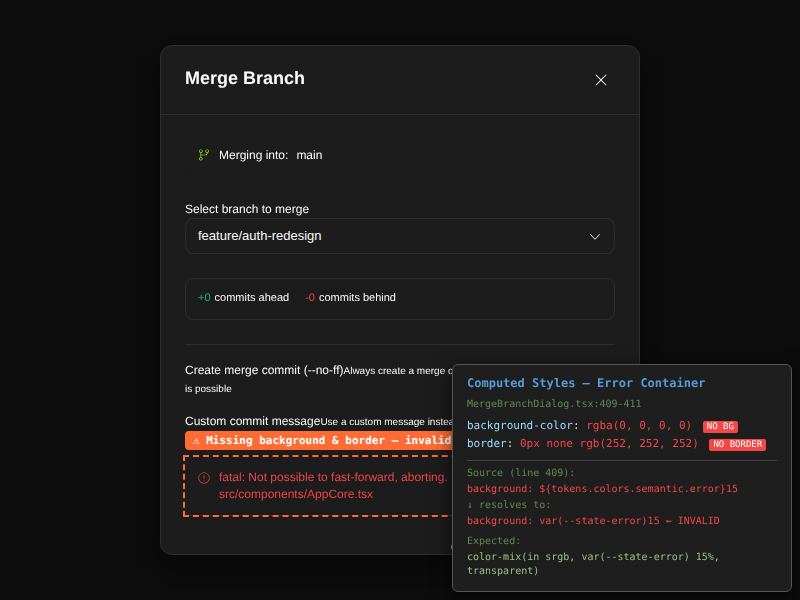
[BUG] [alpha] MergeBranchDialog error container has invalid CSS background and border due to appended opacity suffix #66

Description

Description
In MergeBranchDialog.tsx lines 409 and 411, the error container background and border use template literal string concatenation to append opacity hex suffixes to CSS variable tokens:
// Line 409
background: `${tokens.colors.semantic.error}15`,
// Line 411
border: `1px solid ${tokens.colors.semantic.error}40`,
tokens.colors.semantic.error resolves to var(--state-error) (defined in src/design-system/tokens/index.ts:90). At runtime, this produces:
background: var(--state-error)15;
border: 1px solid var(--state-error)40;
This is invalid CSS — the browser cannot concatenate a resolved CSS variable with a trailing string. The entire declaration is dropped, resulting in no background color and no border on the error container. The error message text is still visible (because color: tokens.colors.semantic.error works as a standalone value), but the error box has no visual container styling.
Expected: Use color-mix() or a dedicated error background token:
background: color-mix(in srgb, var(--state-error) 15%, transparent);
border: 1px solid color-mix(in srgb, var(--state-error) 40%, transparent);
Steps to Reproduce
- Open Cortex IDE
- Open the Git panel and click "Merge Branch"
- Select a branch that causes a merge conflict or error
- Observe the error message at the bottom of the dialog
- Notice the error container has no background and no border — the text floats without a styled container
System Information
- Cortex IDE alpha (latest)
- OS: Linux x86_64
- Browser engine: Chromium