These are the topics for week 3:
- Normalization
- Normal forms
- Transactions
- SQL injection
- NoSQL (with MongoDB)
- How to do CRUD operations
- Non-relational vs. relational
When developing the schema of a relational database, one of the most important aspects to be taken into account is to ensure that the duplication is minimized. This is done for 2 purposes:
- Reducing the amount of storage needed to store the data.
- Avoiding unnecessary data conflicts that may creep in because of multiple copies of the same data getting stored.
Database Normalization is a technique that helps in designing the schema of the database in an optimal manner so as to ensure the above points.
The core idea of database normalization is to divide the tables into smaller subtables and store pointers to data rather than replicating it.
There are various database “Normal” forms. Each normal form (NF) has an importance which helps in optimising the database to save storage and to reduce redundancies. These normal forms build incrementally. e.g. a database is in 3NF if it is already in 2NF and satisfied the rules for 3rd normal form. Below you'll find details for the primary forms:
- Rule 1 : Single valued attributes (each column should have atomic value, no multiple values)
- Rule 2 : Attribute domain should not change
- Rule 3 : Unique names for attributes / columns
- Rule 4 : Order does not matter
No partial dependency. (i.e. no field should depend on part of the primary key) Example
Score table (student_ID, subject_ID, score, teacher)
Subject table (subject_ID, subject Name)No transitive dependency (i.e. no field should depend on non-key attributes).
For any dependency A → B, A should be a super key.
To increase your understanding, study the following materials:
- Database Normalization in Simple English
- Database Normalization with examples
- Normalization and normal forms
A transaction is a set of SQL commands that you want to treat as "one command." It has to either happen in full or not at all.
Imagine writing a program for transferring money from one bank account to another. To do that you have first to withdraw the amount from the source account, and then deposit it to the destination account. The operation has to succeed in full. If you there is an error halfway, the money will be lost.
To start transaction in MySQL we use the keyword begin transaction;. Then we execute the series of commands. For example, in our money transfer example: UPDATE account SET balance = balance - 100 WHERE account_no = 987654 ; then UPDATE account SET balance = balance + 100 WHERE account_no = 123456 ;. If there are no errors you can use commit; which makes the changes final in the database. If there was an error and you want to abort you can use rollback;. This will undo all the commands from the transaction.
To increase your understanding, study the following materials:
Some SQL clients accept input from the user to fabricate the queries.
A malicious user can tweak the input so as to acquire more information from the database or
to destroy the database (literally!). Demo program sql-injection.js is in the Week3 folder.
Consider the following query SELECT name, salary FROM employees where id = X.
/* If X is `101 OR 1=1`, then the query returns all records because 1=1 is always true */
SELECT name, salary FROM employees where id = 101 OR 1=1;/* If X is `101; DROP database mydb`, then the query will delete the entire database */
SELECT name, salary FROM employees where id = 101; DROP database mydb;To prevent SQL injection you have to use prepared statements. The diagram below summarizes nicely how prepared statements work:

With prepared statements we instruct the database to treat certain parts of a query only as a string and nothing else. Even if the string is a valid command it will not be evaluated or executed. To make this as safe as possible the SQL query is sent first, followed by the parts which need to be treated as strings. The syntax for prepared statements is:
PREPARE example FROM SELECT name, salary FROM employees where id = ?;
SET @id = 5;
EXECUTE example USING @id
To increase your understanding check the following materials:
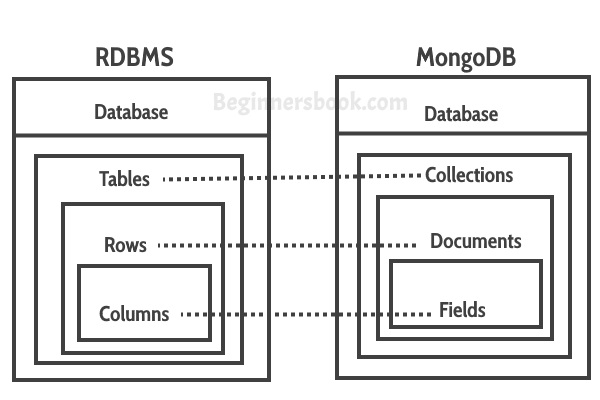
https://beginnersbook.com/2017/09/mapping-relational-databases-to-mongodb/
A schema need not be enforced or even exist:
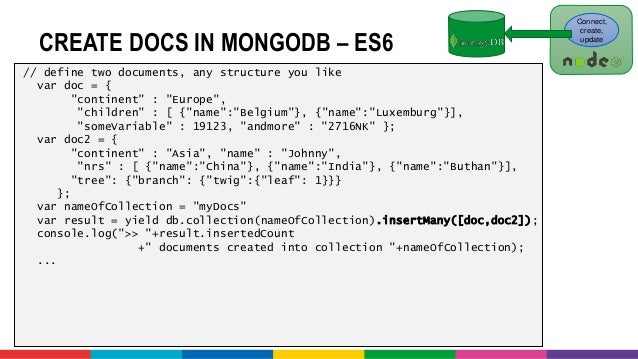
In MongoDB, one record looks like this JSON object:
{
  "_id": ObjectId("528ba7691738025d11aab772"),
  "proj_no": "123",
  "proj_name": "HackYourDatabase",
  "project_tags": ["lastyear,backend, javascript, nosql"]
}
In MySQL a record needs a table, and then the following row:
| proj_no | proj_name          | start_date   | project_tags                           |
| ------- | ------------------ | ------------ | -------------------------------------- |
| 123     | “HackYourDatabase” | “2019-12-30” | "lastyear, backend, javascript, nosql" |
Better, in first normal form:
| proj_no | proj_name          | start_date   | project_tag  |
| ------- | ------------------ | ------------ | ------------ |
| 123     | “HackYourDatabase” | “2019-12-30” | "lastyear"   |
| 123     | “HackYourDatabase” | “2019-12-30” | "backend"    |
| 123     | “HackYourDatabase” | “2019-12-30” | "javascript" |
What happens if I want to update the name of the project? (a peculiar way to do it, but might happen)
UPDATE proj_name = "HackYourMongo"  where proj_no = 123  and  project_tag = "backend"

| proj_no | proj_name          | start_date   | project_tag  |
| ------- | ------------------ | ------------ | ------------ |
| 123     | “HackYourDatabase” | “2019-12-30” | "lastyear"   |
| 123     | “HackYourMongo”    | “2019-12-30” | "backend"    |
| 123     | “HackYourDatabase” | “2019-12-30” | "javascript" |
Oh no! We lost integrity!
In week 1, you used a mysql database that was 3 tables: cities, countries, and countrylanguage.
We are going to migrate these tables into your Atlas MongoDB account
select * into outfile 'city.csv' FIELDS TERMINATED BY ',' LINES TERMINATED BY '\n' from city;

select * into outfile 'country.csv' FIELDS TERMINATED BY ',' LINES TERMINATED BY '\n' from country;

select * into outfile 'countrylanguage.csv' FIELDS TERMINATED BY ',' LINES TERMINATED BY '\n' from countrylanguage;
Then in Atlas , follow add my own data to import the csv data into new collections.
For homework, you will perform CRUD operations and aggregations on them. Also queries with joins (you will see perhaps how hard this is).
Are you finished with going through the materials? High five! If you feel ready to get practical, click here.